Changing how you contact us online

Background

Anima was introduced into the practices within the South Somerset West Primary Care Network in April 2024. During this time, we’ve listened carefully to your feedback. Many of you have told us that Anima felt difficult to use, took too long to complete, and asked too many questions.

Our Patient Services teams also found that calls were taking longer, and Clinicians shared that at times, they found the system complex.

With the upcoming merger of our practices, we’ve taken the opportunity to review our systems. After careful consideration, we have made the decision to move to a simpler, more flexible system which will suit our patients and staff better.

A new system from late April 2026

Our clinical leadership teams have been looking at options that already work well in Symphony Healthcare Services as this will allow us to build on the experience of our colleagues across the county. We’re pleased to confirm that from late April 2026, we will transition to askmyGP.

askmyGP will be familiar to many of you, as it was used by most of our practices until April 2024 (with the exception of Crewkerne Health Centre, who previously used Klinik but have used askmyGP in the past).

We know that lots of our patients and staff loved the simplicity of askmyGP and since we first adopted askmyGP in 2020, the system has developed further. We believe that returning to the system is the correct choice based on patient and staff feedback.

We're confident you will find it simple to use and if you do have any difficulty, we're here to help.


Signing up for askmyGP - Patient Help Centre

How to Register for askmyGP?

**Please note that sign up to askmyGP is currently unavailable - we will contact all patients once links to the system are live**

All patients will need to register with askmyGP to access it online through our website.

You can watch a video guide (0:00 - 2:30)  by following this link: How do I make a request? : askmyGP support (this video also covers how to submit a request!)

You can also access this written guide with helpful screenshots if this suits you better:  How do I register as a user? : askmyGP support


I had an askmyGP account previously, can I just use these details?

In short, no. We know that many of you will have had askmyGP accounts prior to the transition to Anima in April 2024. Unfortunately, when your practice moved away from askmyGP, these accounts were deleted (after ensuring all of your request information was saved in your medical record).

You will therefore need to sign up again - this is easy to do and you can follow the first part of this video guide: How do I make a request? : askmyGP support or this written guide: How do I register as a user? : askmyGP support

I share an email address with someone else. Will it be OK to use the same one for both of us?

No, every login must have a unique email address, so you cannot share them. Some email providers allow you to create different addresses which come into the same inbox and you should be able to find this information on your email providers help centre. For example in the case of Gmail, if your address is johnandmarysmith@gmail.com you could register John with the email johnandmarysmith+john@gmail.com and Mary with the email johnandmarysmith+mary@gmail.com.

Note that you can 'make a request for someone else', also known as a proxy request. To learn how to do this, you can use this guide: Can I make a request for someone else? : askmyGP support

What are the askmyGP Terms of Use and why do I have to sign them?

As before, askmyGP as a processor of data will have an agreement with you to use their platform.

You can find the askmyGP terms of use here: End User Licence Agreement (EULA) - askmyGP

Return to your practice website here:

You will be able to sign up for askmyGP at your practice soon, but this must be done on your practice's website. Find the links back to your practice website here:

Home - Buttercross Health Centre and Ilchester Surgery

Home - Crewkerne Health Centre

Home - Hamdon Medical Centre

Home - Martock Surgery & South Petherton Medical Centre


What is askmyGP and why change now?

askmyGP is known as an online consultation system which allows patients to submit requests to their GP surgery online. The system also supports what is known as a “total-triage” process, where all incoming requests to a surgery (both online and via the telephone) are reviewed by the Clinical team and acted upon accordingly based on clinical urgency. Our practices have been using this system for several years. Using askmyGP has a number of benefits:

Shorter, simpler online forms, allowing you to describe your request in your own words.

A simpler, more streamlined experience when calling the surgery.

A simpler system for our team to use, whilst still providing the ability to effectively review and direct your requests to the correct person.

Better data insights to support our teams in improving the service you receive.


What do you need to know/do?

Look out for more updates over the coming weeks but in the meantime, continue to contact us as you normally would.

When we ask you to, use the helpful guides on this page to set up your askmyGP account, ready for when the system goes live. (If you had an askmyGP account before Anima, this will no longer exist, so you’ll need to register again)

Your Anima account will be deleted, but all information from your past Anima requests will be safely stored in your medical record before this.

Please be patient with our staff while they close down Anima and prepare for the change.

And most importantly, give askmyGP a try when you need to contact us. We hope you find it easy and convenient to use!


Thank you to our patients

As always, we thank you all for your support and patience as we work towards the merger of our practices and the transition to askmyGP. On the remainder of this page you will find resources including a “Patient Help Centre” which will be updated with links to the most relevant guides as we transition to askmyGP. You will also find FAQs below and a link to a patient query/feedback form if you wish to ask a question.


Frequently Asked Questions

How do I make a request?

To register a new askmyGP account and submit a medical request to your practice, please follow the steps in the video demo below:

How do I make a request? : askmyGP support

Can I make a request for someone else?

Yes. First register yourself as a user at the practice where the person who needs help is registered. Once you are registered, there is an option to select 'I am asking as a Parent or Carer.'

How do I attach and image or file to my request?

You can add an image or attachment to a request by following the steps below:

1. Login to your askmyGP account
2. Select 'New request'
3. Select 'Consult your GP'
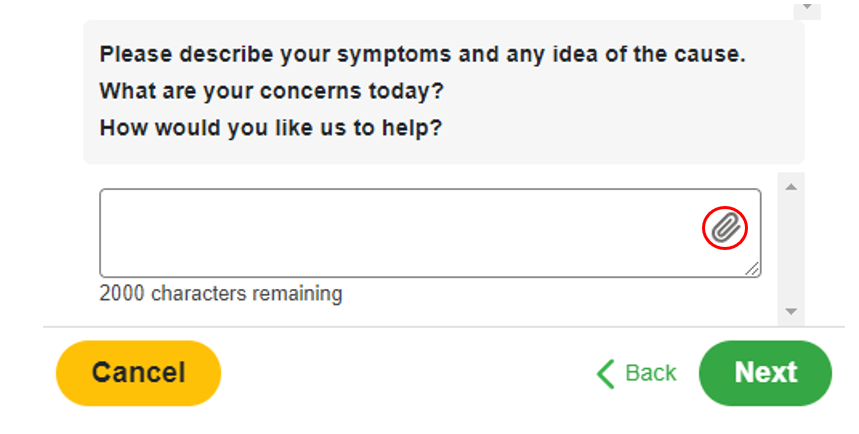
4. Answer the questions that follow until you reach the below question:

mceclip2.png

5. Click the paperclip icon circled above and then choose the attachment you wish you to upload. On mobile devices and tablets, you will be able to take a new photo from your camera and upload it to your request.

Note:
Supported image formats are: png and jpeg.
Supported document formats are: pdf, doc, docx, odt, xls, xlsx, ods
The maximum supported file size for a single attachment is 2MB

Can I save my requests/messages in progress?
Why can't I see my older requests?

askmyGP archives requests which were completed more than 3 months ago and allows you to quickly access older requests at any time.

By default, when viewing your previous request list, you will initially only see the more recent ones and will notice a ‘Show earlier requests’ button at the end of the list.

Clicking this button will show all the other requests which are more than 3 months old. You can then select the one you need to view it, or navigate through the pages to head further back to even earlier requests.

I’ve changed phone number, address, or email address - how do I update my account?

To change your contact details on askmyGP, please follow the guide below. Please note that whilst this will update in askmyGP, we recommend that you let us know so we can ensure your medical record is updated as well.

I’ve changed phone number, address, or email address - how do I update my account? : askmyGP support

What happens if I forget my password?

If you forget your password you can request a password reset email so that a new one can be set.

On the login page, simply click "Forgotten Password"

Next, type in the email address registered with your account and select 'Send Password Reset Link', and we will email you a link to reset your password:

You can follow the instructions on the email to reset the password, and then you can log in with your new credentials.

Note: When your password is changed, you will receive an email to advise that your 'Login details changed for askmyGP'

For a visual guide, please visit the askmyGP support website: What happens if I forget my password? : askmyGP support

How do I change my password?

If you wish to change your password, you can do so when logged into your askmyGP account by selecting ‘Edit my details'  from the top right-hand menu.

  • You can then click the 'Change Password' button:
  • You will be asked to enter your current password and then create a new password to replace it:
  • Once you have done this, you can select 'Confirm' at the bottom of this screen to save the changes.

Note: When your password is changed, you will receive an email to advise that your 'Login details changed for askmyGP'

For a visual guide, please visit the askmyGP support website: How do I change my password? : askmyGP support

If you have any questions that are not covered by the content or FAQs on this page, please complete this form. If you have difficulty seeing or accessing this form on this webpage, please follow this link to open it in a new browser window: Symphony South Healthcare askmyGP rollout - Patient Query form – Fill in form

**Please note that this form is not for medical problems or queries for your GP practice, please visit your practice's website for their contact details**